What is White Space and Why is it Important?
White space isn't empty. It's one of the most deliberate tools in a designer's kit and one of the most overlooked by businesses building their own websites.

There is a particular kind of anxiety that sets in when people look at an early draft of their website design. The pages feel too open. Too sparse. There is all this room on the screen and nothing filling it. The natural response is to add something, be it a background graphic, an extra paragraph, another testimonial, or a decorative border. The page starts to fill up, and the anxiety recedes.
The problem is that the first instinct was correct, and the response to it was wrong. And in many cases, the anxiety reduced by “filling your page”, in turn, induces anxiety for the end-user of your website
What those open pages had was white space. And white space, despite its slightly misleading name, is not nothing.
A Counterintuitive Principle
White space is the term designers use for the empty areas on a page. The gaps between paragraphs, the margins around images, the space between elements, the breathing room between sections of content. It is called white space regardless of whether the background is actually white. It is simply the absence of visual elements.
The counterintuitive fact about white space is that it costs something to remove. When you fill every available area on a page with content, images, or decoration, you are making each element work harder to be noticed -- and in doing so, you are often making all of them less effective. The human eye requires contrast and separation to process information. Without space, content blurs together.
Think of the physical equivalent. A well-designed store with open floor space, clear sight lines, and room to browse feels different from a store where every surface is covered, and every aisle is stacked to the ceiling. The former suggests quality and intentionality. The latter creates anxiety. The same principle operates on screen.
The Work White Space Actually Does
White space serves several distinct functions in web design, and it is worth understanding each of them.
Focuses on the Right Things
When you give an element room around it, you are directing attention toward it. The space around something tells the eye that this thing matters. The most important elements on your page should have the most space around them.
Nature is a great teacher when it comes to this principle. The seeming vastness of some of nature’s greatest wonders, from the deserts to the oceans to the sky, all provide living examples of how space around an item can focus the attention to the item.



Improves Readability
Line spacing, the space between paragraphs, and the margins around blocks of text all affect how comfortable and effortless reading feels. When these are too tight, reading becomes a physical effort. Research on white space and reading comprehension from the Nielsen Norman Group shows that appropriate spacing improves not just how much people read, but how well they retain what they've read. Some studies show comprehension improvements of up to 20 percent(!) when adequate white space is present.
Preceived Quality
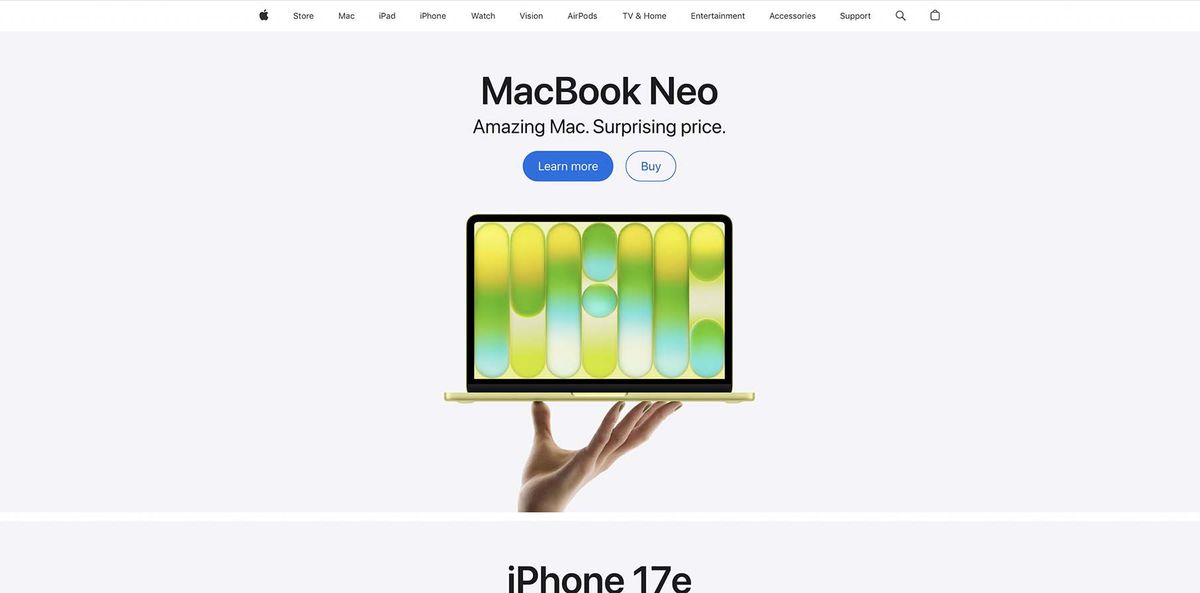
This is harder to measure but easy to observe. High-end brands in fashion, technology, hospitality, and other industries often use more white space than their budget-market competitors. Apple's product pages are a well-known example. The space is a signal: we are confident enough in what we have to offer that we do not need to fill every inch of the screen. That confidence translates to a perception of quality.


The Mistake of Filling
The impulse to fill empty space often comes from a fear that sparse pages look unfinished. But there is a meaningful difference between a page that is empty because it lacks content and a page that is spacious because it is well-designed.
The way to tell the difference is intentionality. Deliberate white space frames and supports the content around it. Unintentional emptiness usually shows up in specific places, such as an odd gap in the layout, a section that ends too abruptly, or a header that floats without visual context. These are problems to fix. The open, airy quality of a well-designed page is not.
If you are building or revising your website and feeling the pull to add more, it is worth pausing to ask what you are actually trying to accomplish. If the answer is "fill the space," that is usually a sign to resist the impulse. If the answer is "communicate something specific," then you have a reason to add it. Even still, it is worth evaluating whether the thing you are trying to communicate is necessary or valuable to your end user.
Applying This Practically
You do not need a designer to start using white space more effectively. A few adjustments tend to make a meaningful difference.
Here’s 3 simple things you can do to make your website more user-friendly by adding some intentional space.
- Increase the line height on your body copy. Most website templates default to spacing that is slightly too tight. The W3C's Web Content Accessibility Guidelines recommend a line height of at least 1.5 times the font size for body text -- a threshold many default templates fall below. A modest increase makes text noticeably easier to read.
- Add more space between sections of content. When one section runs directly into the next with minimal separation, the page feels like a wall of information. Clear breaks between sections give visitors a moment to process before moving on.
- Reduce the amount of content competing for attention on any single page. This is the version of white space that requires the most difficult decisions, but it often produces the biggest results.
White space is just one of the design principles we apply when building websites that actually work. Reach out if you'd like some help pruning the dead branches from your website.
Get a Free Website AuditFollow along on Substack to receive the latest articles in your inbox